What Makes an Artist Website Template Fully Customizable?
A template shouldn’t feel like a rigid digital cage. For painters, illustrators, 3D renderers, and sculptors, a template is simply the gallery architecture. If the walls are fixed in place, the art gets squeezed to fit the room, rather than the room expanding to celebrate the art.
Most website builders offer basic color tweaks and font swaps, calling it “customization.” True flexibility, however, lies in how a template handles asset geometry, canvas spacing, and spatial hierarchy. A customizable visual artist portfolio gives you complete authority over display proportions, media density, and site navigation without breaking the code beneath it.
When evaluated from a functional perspective, genuine template flexibility hinges on three core pillars:
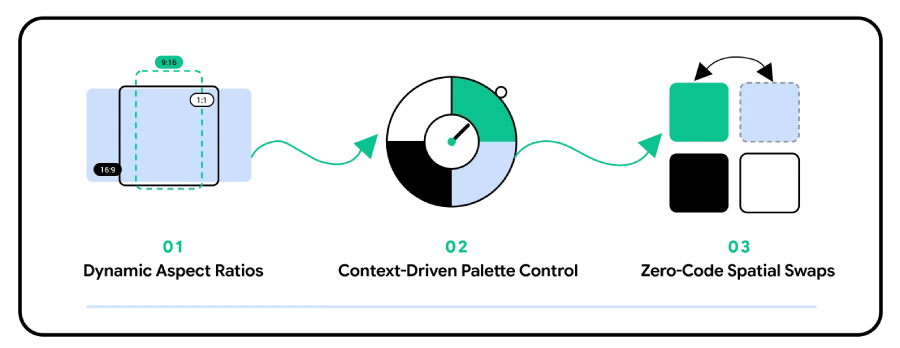
- Aspect Ratio Preservation: Automated adjustments that prevent arbitrary square cropping on vertical portraits or ultra-wide panoramic renders.
- Context-Driven Palette Control: Neutral, adaptive color schemes that auto-adjust base tones to contrast against light or dark media assets.
- Zero-Code Spatial Swaps: Modular grid controls that allow multi-column masonry transitions without touching CSS layout rules.
Essential Customization Features Every Artist Portfolio Template Must Include
Choosing the best website templates for artists means evaluating how much control you keep over how your work is presented. When auditing a template architecture, ensure these foundational controls are fully accessible:
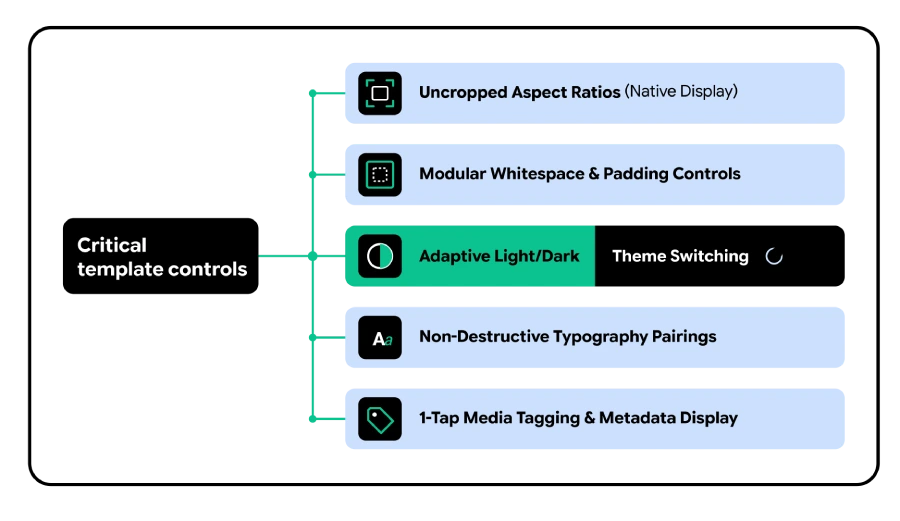
1. Aspect Ratio & Crop Rules
The aspect ratio of your artwork is something you likely put a lot of thought into. For example, a 4:5 portrait, a 16:9 cinematic view, or a more free form cut. Uniform square box cropping of all your images on your website would completely ruin your artwork.
Customization vs. Conversion Data: In a recent survey, most of the art collectors and creative directors said they would leave artist portfolio sites that used a template that didn’t allow for flexibility. If an artist’s portfolio uses a fixed aspect ratio that clips artwork edges, collectors are even more likely to leave the artist’s site.
2. Spacing, Margins, and Whitespace Density
Whitespace is used to separate images or text and improve the user experience by giving it more breathing room. You must have a template where you can control the thumbnail margin, row height, and overall page margin. Tight margins work great for a high density layout of concept art, but a fine art photograph and luxury fashion sketches would be best viewed with wide margins.
3. Dynamic Color & Canvas Contrasts
Quickly define your primary colors and text styles while ensuring the background is neutral. It doesn’t matter if your study is dark black for 3D art or an oil painting for a warm white; you must ensure the background adjusts to your preferences.
Branding Impact Metric: Artist sites that have been designed with customized brand colors and fonts and domain names get more artist inquiries than the default design.
4. Typography Scale & Hierarchical Pairing
Every font has its own personality, and fonts should not dominate your art. Templates should pair fonts. Choose serif fonts to complement your project descriptions and clean sans-serif fonts to complement your UI menus. A good font template also has slider controls to edit letter spacing and line height.
5. Tap Media Tagging & Metadata Display
Art directors and collectors rarely buy visual art without context; they need to know your exact role, media format, and production year at a glance. Customizable artist templates streamline this by letting you toggle inline credit tags, client names, and project metadata directly below your thumbnails with a single tap. This eliminates manual formatting hassles while giving search engines the structured text data needed to index your portfolio effectively.
What to Expect in 2027: Next-Gen Portfolio Template Technologies
The design of artist portfolio web systems is changing. Displays of art online are becoming faster and shrinking the window for review. The pages are no longer just still photos.
With more adaptability, the pages for portfolio designs of artists for 2027 will include:
1. Auto-balancing Dynamic Canvases
For 2027, designs will use AI to analyze uploaded work and determine the appropriate balance of designs. Instead of an artist manually having to balance their sketches of differing sizes and directions against hero pieces of art in designs of varying complexity, the template will do it for them.
2. Micro-Interactions and Zooming of Vector Based Details
A user’s client will be able to zoom into an image or 3D rendering in the browser in one continuous, vector-based interaction. Clients will also be able to pan through detailed elements, such as brushwork or texture, seamlessly in real time.
3. Edge Delivery of Streaming Adaptive Media and Automated Compression
Heavy images and media do not need to be manually reduced in size to publish to the web. Future designs will stream from edge servers utilizing automated pipeline publishing to deliver WebP and AVIF to the browser.
4. Portfolio Design Analysis Mobile Speed Benchmarks
Portfolios that utilize adaptive grids and automated compression for WebP images have mobile loading times that are much faster than custom coded websites without those optimizations.
5 Quick Template Fixes to Elevate Your Current Portfolio Today
You don’t need to completely rebuild your website to see immediate improvements in client engagement. Implementing these five targeted layout adjustments will instantly elevate your existing portfolio:
- Uncheck “Force Square Cropping”: Switch your gallery settings to Masonry or Natural Aspect Ratio. Allow your horizontal landscapes and vertical studies to live side-by-side without squishing image boundaries.
- Increase Canvas Padding by 20%: Give your media room to breathe. Expanding outer grid margins creates a high-end, gallery-like feel that commands higher client rates.
- Switch to Neutral Background Tones: Replace pure #000000 black or blinding #FFFFFF white with muted charcoal (#121212) or soft alabaster (#F9F9F7) to reduce eye strain and preserve color perception.
- Group Media into Distinct Collections: Stop running personal sketches directly alongside commercial client work. Create separate layout blocks for Commercial Work, Personal Projects, and Process/Studies.
- Enable Direct Project Metadata Tags: Display project year, medium, client name, and your specific creative role right beneath the title block.
Step-by-Step: How to Customize Your Artist Template on Fabrik.io
Customizing your site framework shouldn’t require hiring a web developer or wrestling with complex CSS code. Fabrik streamlines layout modification into a frictionless, four-step visual workflow:
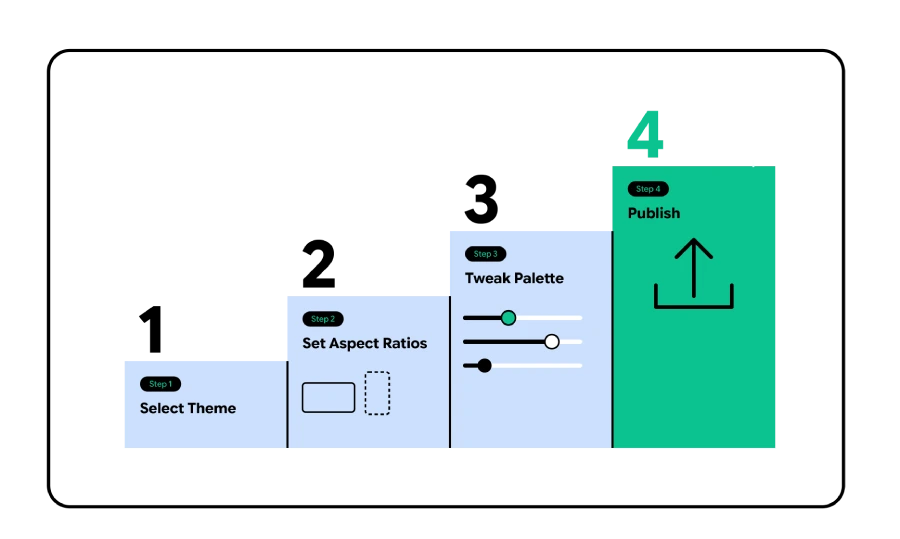
STEP 1.
Choose Your Base Theme: Select a theme curated specifically for visual mediums, such as full-screen video reels, editorial grids, or fine art galleries, from the collection of Fabrik artist portfolio themes.
STEP 2.
Configure Display Ratios: Toggle display preferences between edge-to-edge full bleed, natural masonry, or structured horizontal strips with a single click.
STEP 3.
Customize Typography & Accents: Pick your font pairing, set accent color highlights, and adjust header transparency to align with your personal brand identity.
STEP 4.
Publish Across Viewports: Hit publish. Fabrik automatically compiles your styling choices into responsive layouts optimized for mobile devices, tablets, and desktop monitors alike.
Common Template Customization Mistakes Artists Should Avoid
- Over-Customizing Decorative Animations: Flying text banners, background music, and heavy cursor effects slow down site loading speeds and is not appreciated by the busy art directors.
- Ignoring Mobile Navigation Touch Targets: Placing navigation buttons too close together makes browsing frustrating on small smartphone screens.
- Inconsistent Font Choices: Using more than two distinct font families across one portfolio creates visual chaos and degrades brand professionalism.
- Burying Contact Information Behind Complex Menus: If an interested agency cannot find your contact email or booking form within five seconds, they will leave your site.
Mastery takes years. Your work requires a showcase that is as unique as its form, one that is exceptionally quick and presents your work in the right light to even the world’s most exacting creative directors. It’s Time to Express Your Vision.