
Introduction
A portfolio website has one job: to show people your work and get them to reach out. The builder you choose decides how well it does that job, from how your images and videos display to how fast the site loads and how easy it is to update as your work grows.
On their homepages, most of these platforms look alike. The differences show up in the details, such as how they crop images, play videos, and handle custom domains, and what their cheapest plan leaves out.
In this guide, we compare six portfolio site builders for creatives: Fabrik, Pixpa, Carbonmade, Squarespace, Format, and Portfoliobox. We’ll start with four questions to ask about your own work, cover the features worth checking before you sign up, and finish with a closer look at all six so you can pick the one that suits you.
Four Questions to Answer Before You Compare
A few minutes spent on these will save you from paying for features you’ll never use or missing one you need.
- Is your work mostly images, mostly video, or a mix?
Photographers and illustrators need a builder that keeps images sharp and crops them sensibly. If you’re a filmmaker or animator, check how well the platform embeds video from Vimeo or YouTube and whether your reel plays at full quality. Creatives who work across formats need both. - Do you want to show your work or sell it as well?
Some builders come with an online store, client galleries, and proofing tools, while others focus purely on presentation. Selling also depends on people finding you, so built-in SEO settings that help your pages appear in Google searches are worth checking, along with analytics that show which projects draw the most visitors. For landing commissions or a full-time role, you can probably skip the store, though search visibility still counts. - How hands-on do you want to be?
Designers who enjoy adjusting every margin and font will appreciate deeper design controls. For everyone else, a clean template you can update in ten minutes between projects is worth more than endless options. - Are you comfortable with code?
Every builder in this guide lets you create a full site with templates and a visual editor, so coding is optional. A few also let you add custom code for finer control. If code isn’t your thing, look for a platform that handles layout, mobile display, and image sizing on its own, so your time goes into the work itself.
The Features That Matter in a Portfolio Site Builder
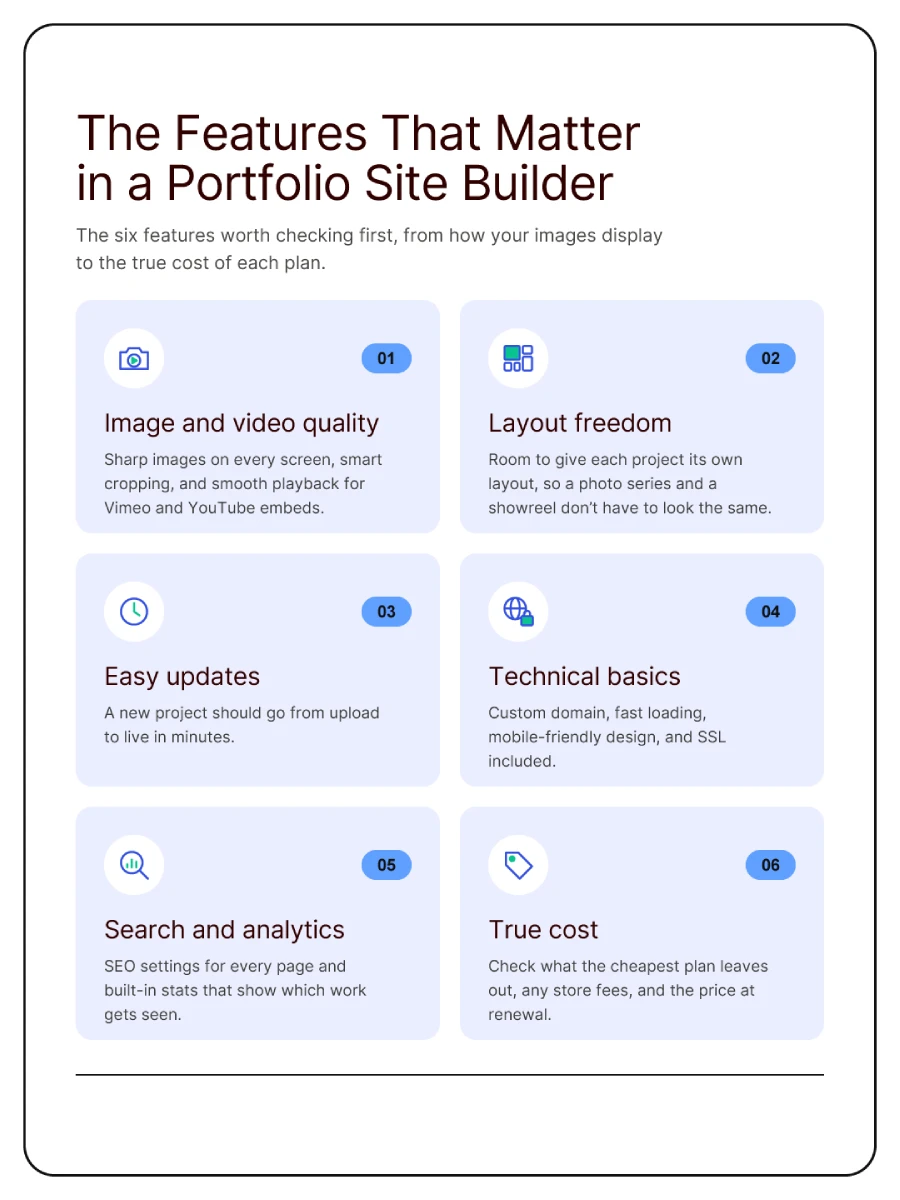
Once you know what your work needs, the next step is to see whether a builder can deliver it. The checklist below covers the six features worth looking at first, from how your images display to the true cost of each plan. Keep it handy while you compare the platforms in the next section.
Related: Online portfolio builder features
6 Portfolio Builders and Where Each One Shines
Each of these builders can put a good-looking portfolio online. The difference lies in what they’re built around, whether that’s showcasing work, selling it, or running a business from it. Here’s a closer look at all six, starting with our own.
#1. Fabrik
Fabrik was built for one purpose, which is to show creative work at its best. It skips the shopping carts and business add-ons, so the platform stays out of your way, and your work stays in focus. More than 10,000 portfolios across 35+ countries have been built on it by everyone from filmmakers and photographers to stylists, 3D artists, and full creative studios.
USP: A portfolio-only builder that gets a polished, video-ready site live in under 10 minutes.
Pros:
- Paste a Vimeo or YouTube link, and your reel plays right inside the project with no re-hosting.
- Give each project its own layout, so a short film and a photo series don’t have to share one look.
- Images are generated for every screen, from phones to Retina and HiDPI displays, so your work looks crisp wherever it’s viewed.
- Switch between themes whenever you like without losing a single upload.
- SEO, Google Analytics, social sharing previews, and custom domains are built in, with no code involved.
- Hosting, security, and speed are taken care of, and a real team is on hand to help with setup, content, and linking your domain.
Best for: Filmmakers, photographers, illustrators, designers, and 3D artists who want their work to do the talking.
#2. Pixpa
Pixpa is built for creatives who want one tool to handle the whole job, from showing work to getting paid for it. Your portfolio, online store, client galleries, and blog all share one login and one bill.
USP: An all-in-one platform for creatives who sell and deliver work as well as show it.
Pros:
- Sell prints, services, and digital files with zero commission, with payments going straight to you through Stripe or PayPal.
- Private client galleries come with proofing, comments, password protection, and expiry dates.
- Over 200 templates and a drag-and-drop editor, plus custom CSS and HTML if you want to go further.
- Live chat and email support from real people, 24/7.
Best for: Photographers and artists who sell prints and deliver work to clients.
#3. Carbonmade
Carbonmade has been around since 2005 and says more than two million creatives have used it. Its editor skips fixed templates altogether, letting you build pages from layout blocks such as galleries, sliders, and grids.
USP: A block-based builder that makes it quick to put together a clean, flexible showcase.
Pros:
- Unlimited uploads and bandwidth
- 4K video uploads, so motion work keeps its quality
- A free trial with no time limit and no card required
- Video tutorials and a support team to help you get started
Best for: Illustrators, motion designers, and graphic designers who want a fuss-free showcase.
#4. Squarespace
Squarespace is a general website builder with a well-designed set of portfolio templates. It suits creatives whose site needs to do more than display work, such as booking clients or sending newsletters.
USP: A polished all-purpose builder that pairs your portfolio with a full suite of business tools.
Pros:
- The Fluid Engine editor gives you fine control over page layouts.
- An online store, invoicing, and appointment scheduling are built in.
- Email campaigns and social media syncing help you promote new work.
- AI tools can draft project copy or generate a starter site, and support is available.
Best for: Creatives who want their portfolio to sit inside a full business website.
#5. Format
Format pairs a portfolio builder with a back office for client work. Alongside 90+ themes, you get tools to manage clients from the first moodboard to the final file transfer.
USP: A portfolio builder with a deep set of client tools for working creatives.
Pros:
- Flex Block lets you place images, text, and buttons freely on a snap grid.
- Upload and play long videos directly on your site.
- Client galleries, proofing, file transfers, and contracts are all built in.
- A commission-free store sits alongside SEO controls for page titles, meta descriptions, and image alt text.
Best for: Photographers and filmmakers who run their client business from their portfolio.
#6. Portfoliobox
Portfoliobox is the only builder here with a free plan, which makes it an easy place to start. Its AI assistant can also edit your site through a simple chat, from adding pages to changing fonts and colors.
USP: A low-risk way to get a portfolio online before you commit.
Pros:
- A free plan with no time limit, covering up to 25 pages and 30 images
- Store, bookings, and invoicing with 0% commission
- Hundreds of templates, including niche ones for architects, makeup artists, and models
- Available in six languages
Best for: Creatives who want to test the waters before they pay.
Find a Builder That Fits Your Work
Every platform on this list will get your portfolio online. The better choice comes down to your answers to the questions at the start: the kind of work you make, whether you plan to sell it, and how much time you can spare for upkeep.
A business-focused builder will serve you well if your site needs to run a store, deliver client galleries, and send invoices. For creatives whose priority is the work itself, Fabrik is the stronger fit. Your reels play inside your projects, every project gets a layout that suits it, and your images stay sharp on any screen. You get all of that without touching a line of code, and with a team ready to help whenever you need it.