
What Is a Landscape Designer Portfolio?
A landscape designer portfolio is more than a digital photo album; it is your primary sales tool. It demonstrates how you solve complex outdoor spatial challenges, manage living materials, and transform raw environments into functional, beautiful outdoor spaces.
Whether you specialize in residential garden concepts, high-end hardscaping, commercial urban spaces, or sustainable native planting, your portfolio gives prospective clients, and design firms a clear look at your creative process, technical precision, and aesthetic range.
What to Include in a Landscape Designer Portfolio
To build a well-rounded landscape design portfolio, you need to highlight both the final aesthetic results and the technical thinking that made them possible.
High-Resolution Photography: Clear shots of completed work in optimal natural lighting.
Before-and-After Sequences: Visual proof of site transformation that highlights your problem-solving abilities.
Concept Sketches and Renderings: Hand drawings, CAD layouts, 3D SketchUp models, or hand-rendered master plans.
Planting Plans and Schedules: Documentation showing your knowledge of horticulture, climate zones, and plant pairings.
Material and Hardscape Details: Close-ups of stonework, custom woodwork, lighting design, and water features.
Brief Project Overviews: Short summaries explaining the client brief, site constraints, and design solutions.
Client Testimonials and Project Credits: Direct quotes from happy homeowners or collaborating architects, along with proper credit for contractors and photographers.
How to Present Your Landscape Design Projects
How you structure each project story matters just as much as the photos you choose. Present your work as a structured case study rather than an unorganized image dump.
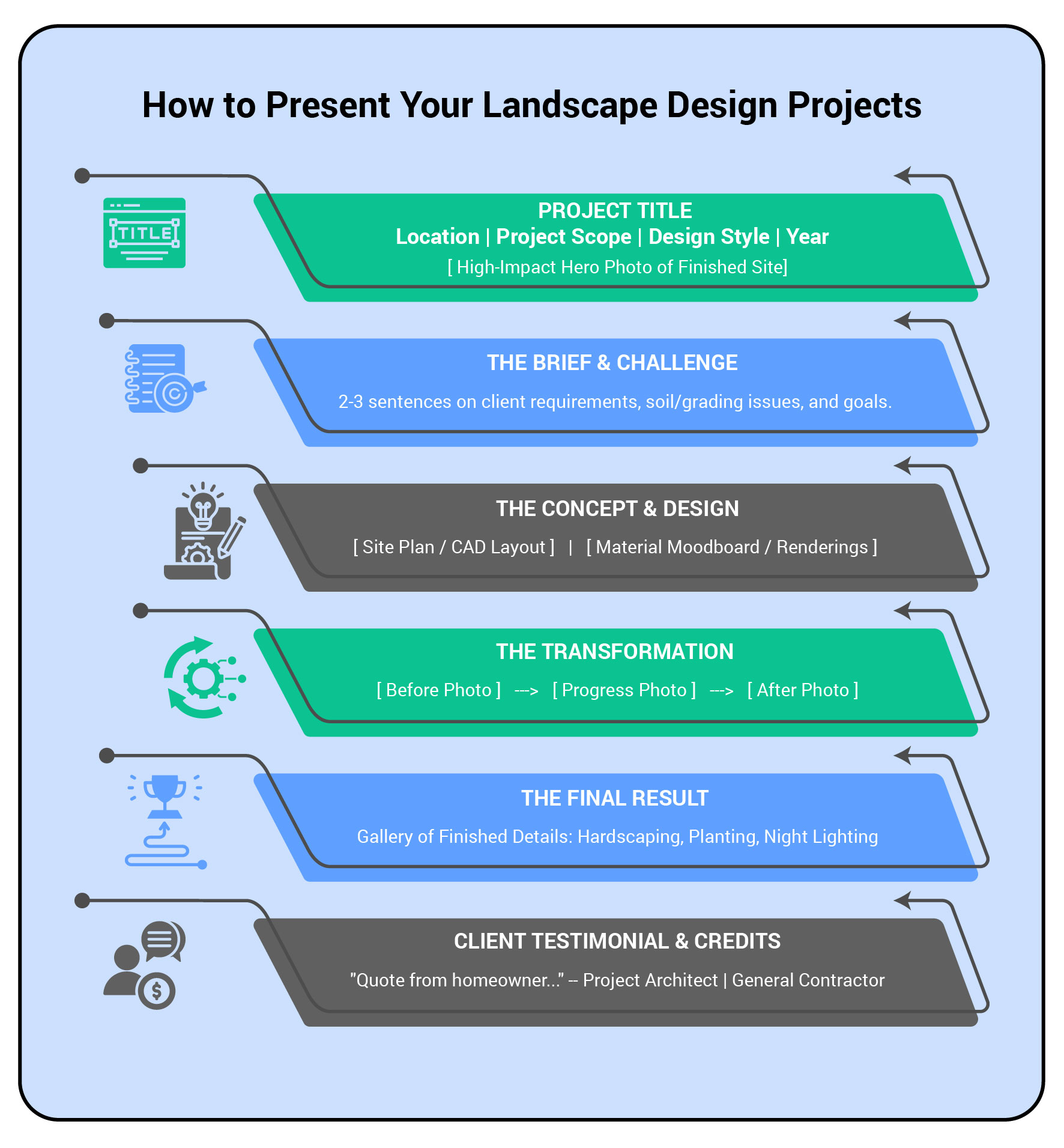
HOW TO PRESENT PROJECT
1. Lead with the Hero Shot
Start each case study with your strongest visual, a wide, well-lit view of the completed landscape.
2. Set the Context
Briefly explain the site conditions. Mention slope issues, poor drainage, shade limitations, or strict budget parameters, and state what the client wanted to achieve.
3. Show the Design Process
Include process assets like preliminary site sketches, CAD drawings, or planting master plans to show how you work from concept to construction.
4. Highlight Details and Nightscapes
Show close-up craftsmanship in stonework, irrigation integration, or custom carpentry. If the site features outdoor lighting, include evening photography to show the space’s full day-to-night versatility.
How to Build a Landscape Designer Portfolio Step by Step
Building a polished online presence doesn’t require web development skills. Follow these four practical steps to get your portfolio online quickly.
Step 1: Select Your Best Work
Resist the urge to upload every project you have ever finished. Select 6 to 10 complete, high-quality projects that represent the specific type of work you want to attract in the future.
Step 2: Organize by Category or Scale
If you handle diverse project types, group them into intuitive navigation categories:
- Residential Gardens
- Hardscape & Outdoor Living
- Urban & Small Spaces
- Commercial & Public Spaces
Step 3: Choose an Adaptive Platform
Select a web builder built specifically for visual media. Platforms like Fabrik use adaptive, zero-canvas architecture that automatically formats your plans, renderings, and full-bleed photos into clean layouts without requiring custom code or template tweaks.
Step 4: Write Short, Impactful Case Studies
Keep text concise and readable. Use simple bullet points for project specs (location, square footage, design style) and short paragraphs for site descriptions.
Landscape Designer Portfolio Examples and Inspiration
When reviewing landscape design portfolio examples, pay attention to how top designers balance full-screen imagery with technical site plans.
Real-World Design Inspirations
Piet Oudolf (Master Planting Design): Known for naturalistic perennial planting, Oudolf’s presentation style emphasizes seasonal color shifts, texture layers, and detailed planting matrices.
Edmund Hollander Landscape Architects (High-End Residential): Hollander’s project displays a mix of wide estate photography and close-ups of custom pool features, stone pathways, and estate entrances.
Studio Outside (Landscape Architecture & Urban Design): Their digital portfolio balances large-scale public spatial layouts with clear render-to-reality project progressions.
Presenting Your Work with Fabrik Layout Architecture
Fabrik.io gives you flexible, zero-canvas themes designed specifically for visual creators. Instead of tweaking complex templates, you pick a layout architecture that automatically formats your landscape photos, CAD drawings, and site plans so they look crisp on every screen:
Full-Bleed Visual Architecture (Loden Theme): Expands your imagery right to the edge of the screen. It is built for large-scale outdoor photography, wide estate views, and high-impact before-and-after transformations.
Editorial & Container Architecture (Coburg Theme): Organizes your project details into clean, magazine-style blocks. Perfect for displaying CAD layouts, planting lists, material swatches, and client reviews right next to your project photos.
Uncropped Feed Architecture (Canvas Theme): Preserves your original aspect ratios without awkward automatic cropping. Ideal for showcasing hand-drawn master plans, vertical garden photography, and detailed site layouts exactly as you drew them.
Structured Grid Architecture (Jute Theme): Displays your work in a clean, balanced grid. Great for organizing projects by category, like residential gardens, hardscaping, or lighting design, so clients can easily browse your portfolio.
Digital vs. Print Landscape Designer Portfolios
| Feature | Digital Portfolio Site | Print Portfolio / PDF Book |
|---|---|---|
| Primary Use | Inbound client inquiries, SEO, social sharing | In-person client pitches, firm interviews |
| Media Types | High-res galleries, interactive before/after sliders, video | Static photography, printed plans, material swatches |
| Updates & Edits | Instant; update images on the fly in minutes | Requires re-printing or re-exporting multi-page PDFs |
| Accessibility | Available 24/7 on desktop, tablet, and phone | Restricted to physical meetings or email attachments |
| Interactive Assets | Direct contact forms, live links to collaborating architects | Static text for credits and contact details |
Common Landscape Designer Portfolio Mistakes to Avoid
Showing Only “After” Photos: Without “before” shots or site plans, prospective clients can’t appreciate the spatial problem-solving your design provided.
Ignoring Mobile Responsiveness: Most portfolio traffic happens on mobile. If your CAD drawings or galleries break on a phone screen, visitors leave instantly.
Including Low-Quality or Poorly Lit Photos: Overcast daylight or bright golden-hour sun works best for outdoor photography. Avoid harsh midday shadows or blurry phone photos.
Forgetting Location and Plant Zone Info: Clients need to know if you understand their local climate, soil types, and regional building codes. Always list the general location or hardiness zone for each project.
Hiding Your Contact Information: Make reaching out effortless. Place a clear contact link on every page and include an obvious contact form.
How to Make Your Landscape Designer Portfolio Stand Out
Highlight sustainable design know-how
Show off your experience with rain gardens, drought-tolerant plants, water conservation, and eco-friendly hardscape materials. Homeowners and developers want smart, low-maintenance landscapes that handle local weather without wasting resources.
Put 3D renders next to real photos
Show your early 3D models right beside the completed build. Seeing a concept drawing next to the real-life patio or garden proves to potential clients that you actually deliver what you promise.
Tag every contractor and photographer
Name the masons, pool builders, contractors, and photographers involved in the project. Giving credit shows you are easy to collaborate with, builds strong industry relationships, and encourages those same pros to send client referrals your way.
Make sure photos load instantly
Compress your image files before uploading them to your site. High-resolution gallery pages shouldn’t lag; if a client has to wait several seconds for your photos to open, they will close the tab and move on to another designer. Use a portfolio builder that protects your image quality, so your work stays sharp on every screen, such as Fabrik.io.