A professional portfolio comes with its fair share of conundrums. Which projects deserve a place? How much of your work should be public? Should every project follow the same format, or does a film need a different treatment from a photography series? And somewhere between choosing the layout and getting the details right, the original idea can get lost in a maze of decisions.
To understand how to create a professional portfolio, think beyond its visual appeal. How you present your work, explain your contribution, and organize projects can shape how people understand your abilities. A portfolio should give your work room to speak, without leaving visitors to decipher what they’re looking at or why it matters.
Here are 10 mistakes worth watching out for when putting your portfolio together, along with ways to avoid them.
#1. Building a Portfolio Without a Clear Direction
When your portfolio has too many unrelated categories or sections with barely any work in them, visitors can struggle to figure out what you specialize in. They shouldn’t have to piece together your creative identity from a dozen different projects.
Before you publish, decide which categories belong in your portfolio and whether you have enough relevant work to represent each one. Give every section a clear purpose, and make sure the categories fit together rather than compete for attention.
Take Kirstie McNulty’s portfolio on Fabrik, for example. Her work is divided into categories such as fashion, editorial, lingerie, music & film stills, and weddings, making it easier for visitors to explore specific areas of her work.
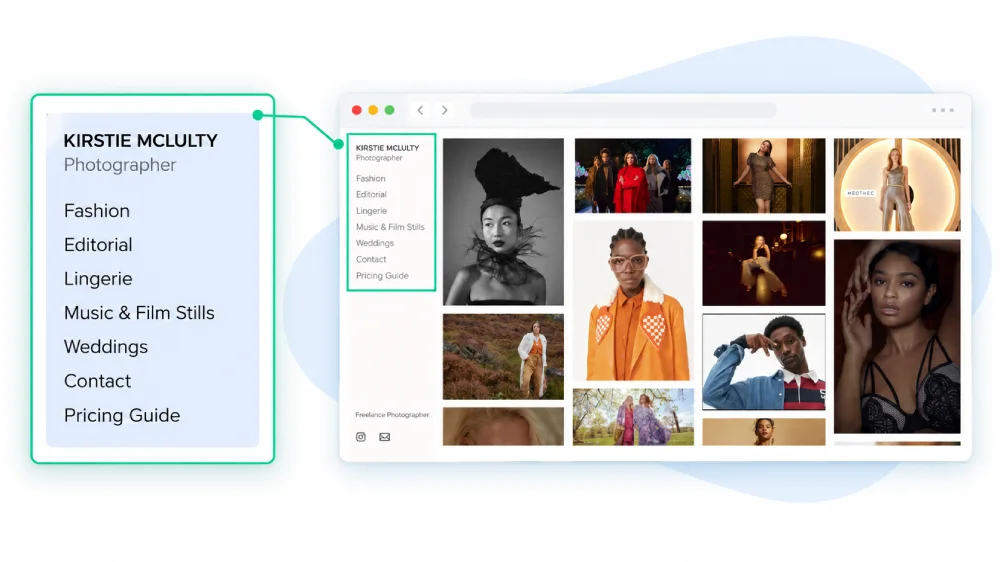
When planning an online portfolio, ask yourself: what does a professional portfolio look like when its owner works across different specializations? It should offer a clear sense of direction without limiting the range of work you can showcase.
#2. Mixing Different Kinds of Work Without Proper Segregation
A client looking for a VFX artist lands on your portfolio and finds fashion shoots, product photography, CGI renders, and animation clips mixed into one gallery. They now have to figure out which projects are relevant to their brief and what skills you bring to the table. That extra guesswork can cost you their attention.
Related work can sit together without a problem. Fashion and product photography, for instance, can live under separate categories within the same photography portfolio. VFX is a different discipline, though, and deserves its own section if you offer both services.
If you’re wondering how to make a portfolio for work across multiple disciplines, start by deciding which projects belong together and which need their own space. And what is a professional portfolio if not a clear presentation of your abilities? Each section should help visitors find relevant work without making them sift through projects unrelated to their needs.
#3. Taking Credit for Work You Didn’t Do
A gorgeous campaign lands in your portfolio, but how much of it was your work? If you collaborated with a photographer, art director, animator, or an entire production team, make your contribution clear. Otherwise, someone viewing your portfolio might assume you handled the whole project when you were responsible for just one part of it.
Mention your role alongside the project, whether you handled the illustrations, editing, photography or visual effects. Your contribution deserves recognition, and giving credit to collaborators shows that you understand how creative work gets made.
#4. Picking a Design That Doesn’t Go with Your Work
Your portfolio design can make your work look great or leave it fighting for attention. Think about it: if the colors, fonts, background, and layout all demand attention, where are visitors supposed to look first? You don’t want someone to remember your website’s flashy design but barely remember the work you created.
The trick is to make the website feel like an extension of your work. If your projects are colorful and expressive, your layout can reflect that personality. If your work relies on subtle details, give those details room to breathe. You don’t have to play it safe with a plain white background, either. Just make sure the design complements your work instead of competing with it.
Take the example of Esther Lalanne’s portfolio on Fabrik. The bright pink background, playful lettering, and colorful illustrations feel like they belong together. The website has its own personality, but the artwork still gets plenty of attention.
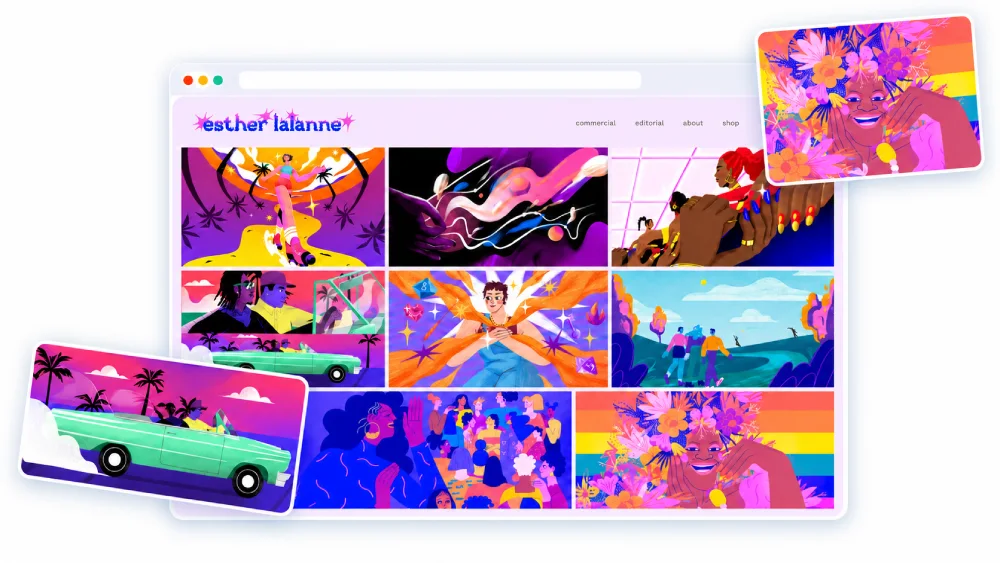
So, when you create an online portfolio, don’t pick a design just because it looks cool on someone else’s website. See how it works with your own projects first.
#5. Publishing Client Work Without Permission
Giving credit to collaborators is one thing. Getting permission to publish the work is another. A client might have paid for a campaign, but that doesn’t automatically mean you can display it in your portfolio, especially if the project is under wraps or covered by a confidentiality agreement.
Before adding client work to your online portfolio, check your contract and confirm what you’re allowed to share. If the project hasn’t been made public, ask for written permission first. One impressive project isn’t worth a breach of trust.
#6. Using Poor-Quality Images and Previews
A blurry thumbnail, a badly cropped image, or a video preview that shows the least interesting frame can do your work a disservice. Visitors might scroll past a project without realizing how good it is.
Use sharp, well-cropped images and choose video thumbnails that give people a reason to click. Before publishing your portfolio, check how every preview looks on the page. Your work deserves a better introduction than a pixelated screenshot.
#7. Making Visitors Depend on External Platforms to See Your Work
If someone has to jump between Instagram, YouTube, and Vimeo just to see what you can do, your work ends up scattered across different platforms. They might watch one video, get distracted by something else, and never make it back to your other projects.
When figuring out how to create a professional portfolio, make your website the main place to explore your work. Embed videos where appropriate, display selected projects directly on your pages, and use external links for additional content rather than making them the only way to view your work.
#8. Leaving Your Bio and Experience Out
Your work might grab someone’s attention, but what will they know about you once they’ve seen it? Without a proper bio, visitors may struggle to understand your specialization, experience, or the kind of projects you can take on.
Mention what you do, how long you’ve worked in the field, relevant projects or clients, and any specialized skills that help set you apart. If you’re wondering how to organize a portfolio, give your bio a dedicated space where visitors can find it without digging through your projects.
David Gibbons, a matte painter and VFX artist, offers a good example. His portfolio bio covers his 20-year career, notable film credits, work with established studios, and experience supervising creative teams. It gives visitors a clearer picture of his expertise than a job title alone.
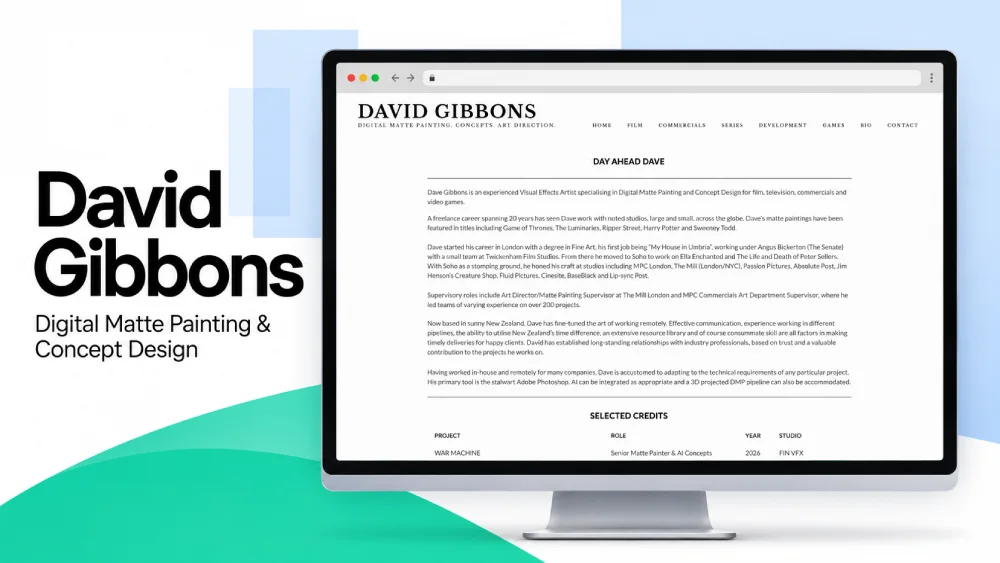
An online portfolio builder can help you create a dedicated bio section, but the content is up to you. Make those few paragraphs count.
#9. Making Your Portfolio Difficult to Navigate
Visitors shouldn’t need a treasure map to find your best work or figure out how to contact you. If the menus are confusing, category names are vague, or important links are buried somewhere on the page, they might leave before finding what they came for.
Keep the navigation simple, use labels people can understand at a glance, and make sure your contact details are easy to find. A little clarity goes a long way.
#10. Publishing Your Portfolio Without Checking It Properly
A broken video link, an image that refuses to load, or a typo in your bio can slip through even when the rest of your portfolio looks great. These small oversights can distract visitors from your work and leave them wondering how much attention went into the details.
Mobile deserves a place on your final checklist, too. Phones accounted for 58.99% of worldwide web traffic in September 2026. Open your portfolio on a phone to check whether images fit the screen, text stays readable, and navigation works without awkward zooming or endless scrolling.
So, what does a professional portfolio look like when it’s ready to go live? Every page should load properly, project links should work, images should display well on mobile, and the text should be free of errors. Before sharing your portfolio, browse it as if you’re seeing it for the first time and fix anything that feels out of place.