We know how important your portfolio is to you; it isn’t just a gallery but a collection of your finest pieces of work that reflect your ideas, thoughts, and creativity.
A great portfolio not only showcases your work but also opens doors to career-changing opportunities. Following the best tips for design portfolios, building one shouldn’t mean wasting entire weekends endlessly tweaking layouts, swapping themes, or micro-managing graphics.
However, small mistakes can quietly undo your hard work. A cluttered homepage, lack of clear focus, or featuring outdated projects front and center will push potential clients away. According to a research by the Nielsen Norman Group, the first 10 seconds are crucial for any portfolio.
The Timeline of a Impression
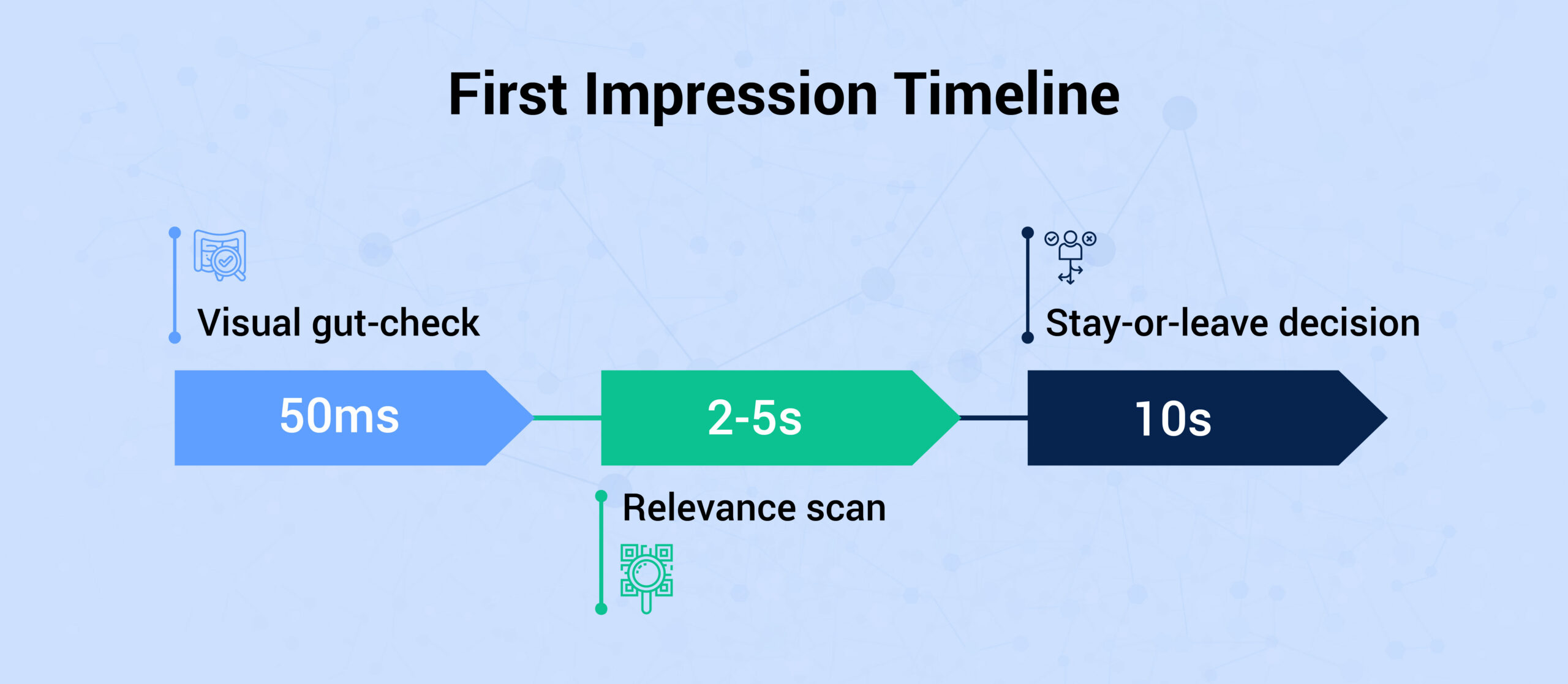
In the first 50 milliseconds, users form an immediate gut judgment based purely on your site’s overall visual appeal and design. Over the next 2 to 5 seconds, they scan the page to determine whether your content feels relevant, clear, and trustworthy. Finally, within 10 seconds, most visitors make their ultimate decision to either stay and explore or close the tab.
You simply cannot afford to mess up during this crucial window. That is why we at Fabrik have curated a list of the most common portfolio mistakes designers make, so you can avoid them, hold a recruiter’s attention, and stop losing potential clients.
Fix these 10 portfolio mistakes to turn visitors into paying clients.
1. Trying to Appeal to Everyone
This is the most common portfolio mistake to avoid, as when you try to please everybody, you end up pleasing nobody. Packing your site with everything from 3D motion graphics to random brand strategy signals a lack of direction. Clients hire specialists for big projects, not jack-of-all-trades.
The Suggested Fix: Pick a core skill or niche and let 80% of your portfolio reflect it. Put personal experiments in a dedicated “Side Projects” tab.
2. Prioritizing Quantity Over Quality
A grid of 20 mediocre projects dilutes your best work. Clients will judge you by your weakest piece.
The Suggested Fix: Trim the fat. Keep only 6 to 10 of your absolute strongest, most relevant projects.
3. Hiding the Story Behind the Work
Pretty mockups look great, but they don’t explain how you solve problems or what your actual role was.
The Suggested Fix: Frame projects as short, scannable case studies: outline the brief, your process, and the outcome. This is among the best design portfolio practices, as it not only shows your work but also explains your thought process.
4. Every Project Looks Identical
If every piece in your portfolio is a mobile app with the exact same aesthetic, clients assume you can only do one thing.
The Suggested Fix: Show some variety. Design for different screens (websites, dashboards, smartwatches) and different industries (finance, healthcare, e-commerce). Show range, not repetition.
5. A major playout tips for designers: Wrestling with Rigid Layouts
Redesigning a template on typical site builders often means re-cropping every asset and re-linking page from scratch. A rigid layout often derails an otherwise great portfolio; facing endless structure changes can leave even top-tier pros searching for how to fix a design portfolio.
The Suggested Fix: Choose a system where your media sits independently from the presentation layer. Platforms built for creators, like Fabrik, let you swap between grid layouts, carousels, or horizontal strips in one click without re-uploading anything.
6. Ignoring Mobile Navigation
A huge chunk of creative directors and agencies browse portfolios on their phones between meetings. If your layout breaks or images get cropped awkwardly, you lose credibility.
The Suggested Fix: Preview your site on mobile before hitting publish! Fabrik handles the responsive design for you, keeping your portfolio sleek and fast on every device.
7. Hiding Your Contact Info
Nothing is worse than a client loving your work and then hunting around for an email address.
The Suggested Fix: Put a visible contact button or direct email link on every single page and at the bottom of every project.
8. Using a Static PDF Portfolio: Non-negotiable portfolio mistakes to avoid
PDF portfolios are outdated the second you send them. Clients end up judging you on old work, and you can’t fix typos or update project links once a PDF is in someone’s inbox.
The Suggested Fix: Switch to a live website with Fabrik.io. Your online portfolio stays up-to-date automatically, works smoothly on any device, and ensures recruiters always see your latest, best work.
9. A major portfolio mistake to avoid: Overselling Your Title or Skills
Calling yourself a “Senior Designer” with zero real-world experience raises red flags immediately. So do those meaningless “8/10” skill bars for software.
The Suggested Fix: Be honest. Labeling yourself as an “Aspiring” or “Junior” designer shows confidence and authenticity. Replace software rating dots with one quick line about what you’ve actually built with the tool.
10. Lack of Social Proof and Testimonials
Clients want reviews before they hire you, just like buying anything else online. Amazing work gets attention, but proof of your professionalism closes the deal.
The Suggested Fix: Ask past clients for quick feedback and permission to quote them. Display a few strong testimonials on your site and keep your LinkedIn endorsements updated. Word-of-mouth builds trust faster than any mockup can.
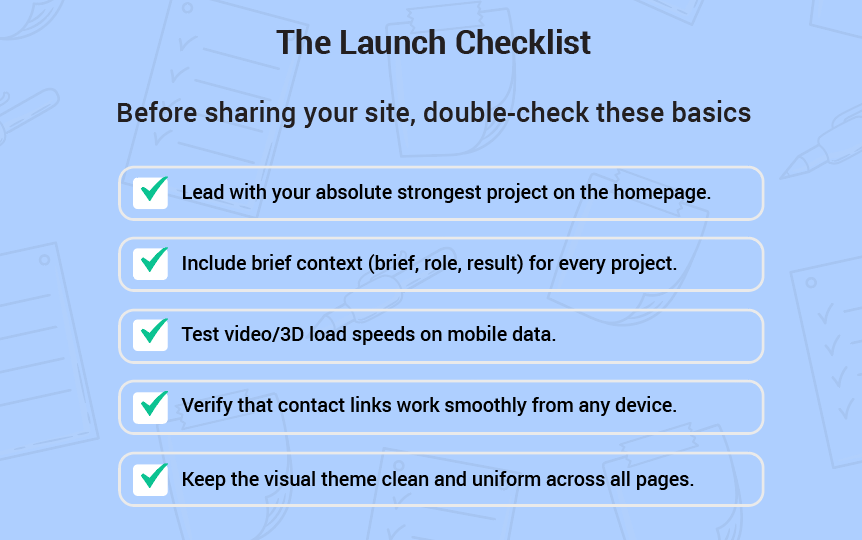
Before sharing your site, double-check these basics:
Conclusion: Stop Fighting Your Site Builder
Fixing a portfolio shouldn’t feel like wrestling with code or wasting a weekend re-cropping images. Fabrik is built specifically for creatives who want fast, beautiful showcases without the structural headache. Upload your media, pick your layout, and let the platform do the heavy lifting for your video, motion, and visual assets.
No setup hassle, no waiting, get your portfolio live in minutes.